News

iPad Display Issues with Stylus: Why Copy Pens Cause Touch Problems

iPad Display Issues with Stylus: Why Copy Pens Cause Touch Problems

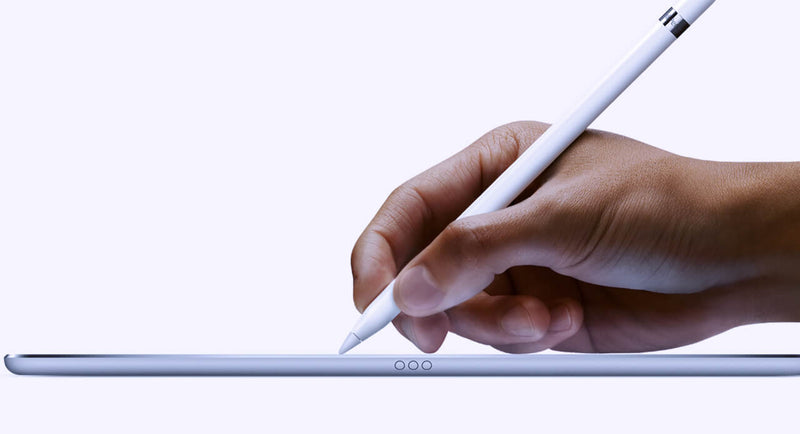
Lately, we’ve been seeing more and more cases where customers report that the iPad display is “not responding properly” when using a pen. At first glance, it looks like a touch issue, but after testing quite a few of these, the pattern is pretty clear. In most cases, the display is actually fine. The difference comes down to the type of pen being used. When we test with an original Apple Pencil, everything behaves as expected. You can write normally, rest your hand on the screen, and the input stays stable. No jumps, no interruptions. But when we switch to a copy pen, things change. If you only use the tip, it often works okay. The moment you rest your hand on the screen while writing, you start seeing issues. Lines break, touch becomes inconsistent, or the screen seems unresponsive. That’s usually the moment customers think the display is defective. From a repair perspective, this is where things go wrong if you’re not careful with testing. If you only test quickly with a pen—especially without resting your hand—you might miss it. If you don’t ask what pen the customer is using, you might approve an RMA that shouldn’t be one. The easiest way to avoid this is to go back to basics when testing: First, use your fingers and check the full screen If touch works fine everywhere, that already tells you a lot Then test with an original Apple Pencil (your reference) Only after that, test with a third-party pen and simulate real usage (including resting your hand) That last part is important because that’s exactly where copy pens tend to fail. It’s not the screen struggling—it’s the pen not handling palm rejection properly. We’ve also found that asking the customer one simple question upfront saves a lot of time: “Are you using an original Apple Pencil?” In many cases, that alone points you in the right direction. If there’s still doubt, ask for a short video from the customer. You can usually see immediately whether it’s a display issue or just how the pen behaves when the hand is on the screen. Key takeaway If the display works fine with touch and behaves correctly with an original pen, then it’s not a screen problem. What looks like a defect is often just the limitation of a copy pen. Catching this early means: Fewer unnecessary returns Less back-and-forth with customers A smoother repair process overall      

Read more
  • iLavender_Qianli

    iLavender OS-Key: The best tool to save time when repairing Apple devices

    Imagine this scene: You get an iPhone 8 for a display repair, but it has already been fixed by another technician and you need to know the original manufacturer. With the Qianli iLavender OS-Key you don’t even need to connect the screen. Just by entering DFU mode, you may be able to read the original display’s serial number from the internal memory. This way you can then order the compatible display and solve the issue in a very professional way. The days of disassembling the phones just to get simple information are behind! Now, you can just read and write the serial number of the iPhone and iPad, the Wi-Fi and Bluetooth passwords, and many more without removing the NAND. In summary, no need to disassemble the hard disk, repair iPhone and iPad data with one click. All the data you can think of: serial number, model code, region code, touch ID, battery serial number, front cam, rear cam, etc. They can all be read by this novelty device. The iLavender OS-Key is compatible with the following: iPhone SE / 6 / 6S / 6P / 6SP / 7 / 7P / 8 / 8P / X iPad Pro / Pro 2 / Air 2 / Mini 4 / 7 / 6 / 5.   Get yours now by clicking here.  

    Read more
  • QIANLI FACE ID FEATURES

    QIANLI FACE ID FEATURES

    ID Face Dot Projector Repairer Detector. Quick detect whether Dot Projector functions, quick diagnosis of malfunctions (Fused, Disconnection, Short Circuit and etc.), Built-in battery, wireless uses, read and write encrypted chips. The main features of this wonderful tool are: 3 in 1 Programmer, fast checking Face ID ( "normal" "Fuse disconnected" "NTC disconnected" "Short" ). Support update model in the near future. Fast checking the working status of Face ID. Built in internal battery , easy for working. It can write and read chip with password. 3 in 1 Detector - Detection / Read & Write / Programming : Detection : Active Dot Projector to test, fast diagnose malfunction Read & Write : Read encrypted data of original chips, write into Flex / Chips Programming : Programming under layer of chips, support Flex / Chips Product Parameters Brand: QianLi Item Name: ID Face Dot Projector Repair Detector Material: Galvanic Plating Cover Functions: Detection / Read & Write / Programmer; Dot Projector Flex Cable Product Size: 75.50*64.50*11.00(mm) Package Size: 100.00*85.00*21.88(mm) Find more in https://4phones.eu/products/qianli-id-face  

    Read more
  • iPhone 11 Series Non-Genuine Screen Warning

    iPhone 11 Series Non-Genuine Screen Warning

    Have you ever seen the 'Important Display Message' on iPhone 11, iPhone 11 Pro, and iPhone 11 Pro Max devices after third-party display repairs? The notice states, "it’s important for certified technicians who use genuine Apple display parts to repair it." And those certified technicians include Apple, Authorized Service Providers, and Independent Repair Providers who have been approved by Apple to perform repairs using OEM parts and tools. How to fix the iPhone 11 Pro Non-Genuine screen issue? Check out below and you will find the solution you want! Screen Replacement The phone comes with an unresponsive and damaged screen. We need to replace with a new screen. Take apart the phone and remove the screen. Get a new OEM screen installed. Press the power button to turn on the phone. The Important Display Message appears. Tips:the Important Display Message will appear after third-party display repairs and has nothing to do with the replacement screen, whether it’s an aftermarket screen or an OEM screen. Why the Display Repair Warning for iPhone 11 series appears? Why the Display Repair Warning for iPhone 11 series appears? The system will verify the touch module data during start up. Since the touch module is located on the back of the screen, screen replacement can result in a mismatch between the touch module data and the phone. The only workable solution by now is to solder the touch module of the original screen onto the new replacement screen. Also, since the touch module is located on the back of the screen, traditional desoldering tools can easily damage the screen. We will adopt a new chip grinding tool today. Grinding Stick high-temperature tape around the touch module on the replacement screen. Then wrap the screen with protective film. Now we will grind the touch module with the electric chip grinding tool. Be patient during the grinding. Start with the top layer then move on to the next layer. Also, be careful not to damage flex cables nearby. With solder joints coming out, stop the grinding work. Clean the bonding pad with PCB Cleaner soaked cotton swap afterwards. Removing Now we need to remove the touch module on the original screen and solder it onto the new replacement screen. Remove the earpiece speaker and sensor flex cable on the original screen. Then put a piece of paper under the touch flex cable. Heat with Hot Air Gun and pry up the touch module on the original screen. Then apply low-temp solder paste to the touch module. Heat with Soldering Iron at 365℃ to clean residual solder paste and black adhesive. Clean thoroughly with Solder Wick afterwards. Then clean with PCB Cleaner. Continue to get the touch module reballed. Soldering Now we need to solder the reballing-finished touch module onto the replacement screen. Before soldering, insert a pry piece under the touch flex cable. For better operation, we can apply some alcohol here. The metal plate and paper are used here for heat insulation. So that the screen won’t be damaged by high temperature during soldering. Apply some paste flux to the bonding pad. Get the touch module in the right position. Solder with Hot Air Gun. Test Get the earpiece speaker and sensor flex cable installed. Now we can assemble the phone and test. Press the power button to turn on the phone. Go to Settings>About. There is no more Important Display Message here Source: https://www.ifixit.com/Guide/iPhone+11+Series+Non-Genuine+Screen+Warning-Important+Display+Message+-+100%25+Fix/135680

    Read more
  • Chip shortage affects the price increase of laptops, smartphones and more

    Chip shortage affects the price increase of laptops, smartphones and more

    Faced with the price increase situation, have you prepared the stock plan in advance? The market demand is increasing, but the problem of chip production capacity has not been alleviated for a long time, and the price of chips has continued to rise again. Recently, various factories have raised their quotations again by up to 15%. At the same time, downstream packaging and testing plants ASE Investment Control, KYEC and other companies have also increased their demand for packaging and testing due to the massive output of chips, and their production capacity has also been tight. They have also conveyed their intention to increase prices. Manufacturers have no choice but to increase prices Under the condition that the supply of semiconductor is tight and the related products are out of stock, the imbalance of supply and demand in semiconductor market is especially obvious, which gradually leads to "domino effect ". From wafer price to material price, to PCB( printed circuit board) price, sealed price, and finally to chip price. Industry chain upstream materials, wafers, sealing and other links caused by chip price rise tide is gradually spreading throughout the industry. Starting from the fourth quarter of 2020, price increases in the semiconductor field have continued, and news about the tight production capacity of chip foundries in 8-inch wafer fabs is endless. At the end of 2020, the shortage of production capacity has extended to 12-inch wafers. Due to the tight wafer production capacity and strong market demand, many manufacturers have increased the quotations of chip foundry products, and chip price have also become a forced move by major manufacturers. At the beginning of 2021, not only did the chip price surge show no signs of fading, but it has become more and more intense. According to incomplete statistics, since 2021, up to now, there have been more than 40 semiconductor manufacturers that have raised or are about to raise prices. Reasons for price increase Some people think that this round of chip price increase is different from before. In the past, the supply of some chip products was insufficient in the short-term due to the “roasted seeds” and “hoarding” of several categories, which led to price increases, but they were soon able to recover. The price increase this time seems to be even more violent. Not only are several categories out of stock, but the entire line of products such as MCU, GPU, display driver, TWS headset SoC, power IC, etc. are out of stock, which ultimately leads to the entire industry chain. The phenomenon of price increases. As far as terminal chips are concerned, industry experts generally believe that in the early stage of the COVID-19 epidemic, the industry's internal judgments about the future market trend are relatively conservative, and terminal manufacturers are cautious about stocking. However, due to factors such as epidemic prevention and control and home isolation policies, the digitalization process has accelerated significantly. The "home economy" spawned by the COVID-19 epidemic has gradually made home office, distance education, and home entertainment a trend. Therefore, chip products related to these fields Prices have risen accordingly, especially chip products in the fields of mobile phones and personal computers. Price trend forecast So far, the current round of chip price hikes is still ongoing, which may have some conduction effects in the industry. The the conduction effect of chip price increases has already appeared. Specifically, the chip price increase has mainly increased the production cost of terminal electronics, and that the chip price increase has begun, and it is expected that there will be no price decline before the third quarter of this year. The trend is that in the fourth quarter of 2021, market demand for chips will fall. This is because since the second quarter of 2020, manufacturers in the industry are over-stocking, and market demand is not enough to support such a large stocking share and continuous stocking behavior, so market demand will gradually fall from high points, and then help the market. The supply-demand relationship of the chip has reached a balance, thereby promoting the normalization of chip product prices. Source: https://www.bizbee.com/blog/BIZBEE-ANALYSIS-Global-chip-shortage-affects-the-price-increase-of-laptops-smartphones-and-more-Faced-with-the-price-increase-situation-have-you-prepared-the-stock-plan-in-advance.html#.YD3j3QS7bCY.linkedin

    Read more
  • Qianli iBridge Multi-Functional tool

    Qianli iBridge Multi-Functional tool

    It's always been difficult to probe and measure those tiny pins on an iPhone connector. And if you need to probe a connector while it's connected... well, you might as well say goodbye to the rest of your afternoon. This ends today. Enter the iBridge, a modern solution to fumbling around with giant multimeter probes and silently praying we don't accidentally slip and short something out on the logic board. The iBridge offers a breakout board for the LCD, dock/charging port, and front/rear camera connectors! It connects to the logic board and whatever component you would like to test, and allows you to use the device while simultaneously probing the connector at the same time. Additionally, each pin on the iBridge is labeled with the pin function and diode mode measurement, so you can can concentrate on what you're measuring instead of where you are on the schematic. For all the iPhone board repair technicians out there, this is the day we have all been waiting for. Available for iPhone 6, 6+, 6s, 6s+, 7, and 7+, every model have 4 type test cable as: rear camera, front facing camera,dock connector and touch screen cable. The phone board layout is precise and compact, and most PIN pins have no epitaxial line of testing. For example, the board does not connect to the LCD screen. When the boot board can not detect the screen, there will not be relevant voltage output and technicians can not detect and test the voltage value of the relevant circuit. In this link you can find all the iBridge available https://4phones.eu/search?type=product&options%5Bprefix%5D=last&q=ibridge

    Read more