Nieuws

iPad Display Issues with Stylus: Why Copy Pens Cause Touch Problems

iPad Display Issues with Stylus: Why Copy Pens Cause Touch Problems

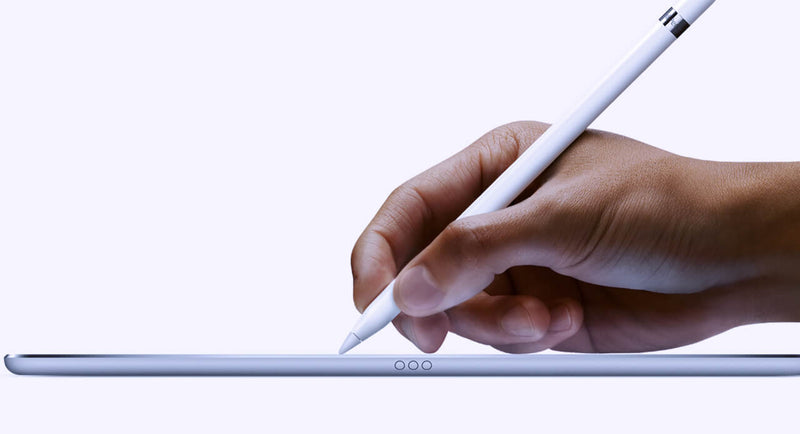
Lately, we’ve been seeing more and more cases where customers report that the iPad display is “not responding properly” when using a pen. At first glance, it looks like a touch issue, but after testing quite a few of these, the pattern is pretty clear. In most cases, the display is actually fine. The difference comes down to the type of pen being used. When we test with an original Apple Pencil, everything behaves as expected. You can write normally, rest your hand on the screen, and the input stays stable. No jumps, no interruptions. But when we switch to a copy pen, things change. If you only use the tip, it often works okay. The moment you rest your hand on the screen while writing, you start seeing issues. Lines break, touch becomes inconsistent, or the screen seems unresponsive. That’s usually the moment customers think the display is defective. From a repair perspective, this is where things go wrong if you’re not careful with testing. If you only test quickly with a pen—especially without resting your hand—you might miss it. If you don’t ask what pen the customer is using, you might approve an RMA that shouldn’t be one. The easiest way to avoid this is to go back to basics when testing: First, use your fingers and check the full screen If touch works fine everywhere, that already tells you a lot Then test with an original Apple Pencil (your reference) Only after that, test with a third-party pen and simulate real usage (including resting your hand) That last part is important because that’s exactly where copy pens tend to fail. It’s not the screen struggling—it’s the pen not handling palm rejection properly. We’ve also found that asking the customer one simple question upfront saves a lot of time: “Are you using an original Apple Pencil?” In many cases, that alone points you in the right direction. If there’s still doubt, ask for a short video from the customer. You can usually see immediately whether it’s a display issue or just how the pen behaves when the hand is on the screen. Key takeaway If the display works fine with touch and behaves correctly with an original pen, then it’s not a screen problem. What looks like a defect is often just the limitation of a copy pen. Catching this early means: Fewer unnecessary returns Less back-and-forth with customers A smoother repair process overall      

Meer lezen
  • Iphone 12: No charger no headphones

    Iphone 12: No charger no headphones

    The novelty that Apple will have for the launch of the iPhone 12, is that it will come without a charger. Decision that would be due to environmental reasons or to reduce costs, according to the brand's analyst, Ming-Chi Kuo.Through a statement accessed by MacRumors, the iPhone 12 will not include headphones or a power adapter in the box.Kuo has considered that the company will launch a new 20W power adapter as an optional accessory for the iPhone and will stop producing 5W and 18W power adapters later this year.In addition, the Apple analyst has claimed that the new 20W power adapter will be similar to the 18W with USB Type-C Power Delivery connector for fast charging.According to the Apple analyst, the production costs of the iPhone 12 will increase due to the incorporation of 5G technology in the new line of the phone. By removing the headphones and power adapter from the box, the company can cut costs, but could also cite environmental reasons.Kuo also believes that Apple will stop including 5W power adapters with the second generation iPhone SE later this year, although it will continue to include a 12W power adapter with the iPad, 10.2-inch iPad Air and iPad mini. .According to some leaks, the new Apple mobile will arrive in four versions of which two will be Pro with three built-in cameras. The equipment will cost an average of $ 1,000. According to a report from Europa Press.In short, an open secret: the iPhone 12 –and its Pro variant– will be the first models in the history of the saga that will not include headphones or a charger in the device box. The event is yet to be confirmed, but there are several sources that have pointed in this direction in recent days, which has made this theory gain strength.The consensus is that the withdrawal of the headphones seems acceptable. However, the removal of the magazine has become a subject of debate. On the one hand, there are those who consider that such a basic element cannot be absent from the phone box. And, on the other hand, there are those who argue that its removal has ecological benefits - the chargers translate into a very high amount of waste - and, furthermore, they affirm that it is possible to acquire compatible chargers for little money. The debate, while valid, only represents the tip of the iceberg. When Apple makes a move like this, it usually does so with a forward-looking strategy. We saw it, for example, with the removal of the headphone jack. This was produced by the hand of wireless headphones, the AirPods, which offer a clearly superior user experience. The interesting debate, therefore, is this: what is the long-term bet that would justify the removal of the charger in the iPhone case?An answer to that question could be the rumored iPhone without ports. Apple has always pushed the use of wireless technologies. We have seen it with the AirPods, with AirPlay 2, with the AirDrop transfer system and also with the removal of ports on their most popular computers. This ideology, which has caused controversy on many occasions, is imprinted in the company's DNA. And the launch of an iPhone without ports, despite the criticism it would bring, would be the culmination of that philosophy.The target scenario would be for everyone to invest in buying wireless charging mats for their homes. These would be universal (Qi) and reusable over time, so that every time you buy a new product, you can use the same mat. Saving the distances, it would be something similar to what happens with professional cameras. Photographers buy new bodies, but they reuse the lenses they have acquired over the years. The benefit derived from this path would be multiple: less garbage would be produced –and Apple always emphasizes this aspect–, costs would be saved and, in addition, we would achieve that fully wireless future that seems so obvious. However, to reach this stage it is necessary to change the foundations of the industry. And that's where the iPhone 12 comes into play, which would be the first to not incorporate a charger into its box and would act as a lever towards that future.The idea is this: do you need a charger for the iPhone 12? If you have a compatible one, perfect, you can use it without problems. But if that is not your case, you probably want to buy a Qi charger, which in addition to working with the iPhone 12, will also work with the phones you buy in the future (even if they are not iPhone) and also with some of the more AirPods. RecentBy not providing a free option with the product, Apple would be inviting consumers to invest in a new charger. And since you are investing in one, why not do it in a wireless one instead of buying a conventional one? The price of Qi chargers has dropped enough to be a viable option from an economic point of view. In fact, at Ikea you can find wireless charging mats for just five euros. Some argue that the removal of the charger would be more manageable if the iPhone 12 brought a USB-C port, which is more universal than the current Lightning. But we cannot lose sight of the fact that Apple's long-term bet is more ambitious than controlling costs or reducing electronic waste. The underlying idea is that the iPhone has no ports. Therefore, it would not be sensible to steer an entire ecosystem - accessory manufacturers, etc. - towards a connector that, on the iPhone, would only persist for a few generations. If you make such an important change, you do it thinking in the long term. And in the case of the iPhone, that future seems to happen through the absence of ports, wireless technologies and open standards. Another point to resolve is the reliability of the chargers, which can influence the degradation of the battery. By incorporating the charger into the box, Apple ensures that the customer uses a suitable charger. By dispensing with it, you unleash third-party chargers that won't always deliver the best performance. Considering the emphasis that Apple places on the durability of its products, this is a factor of great importance.

    Meer lezen
  • Samsung Uitgepakt 2020

    Samsung Uitgepakt 2020

    De Samsung Unpacked 2020 wordt in augustus gehouden en brengt drie nieuwe telefoons met zich mee. Jon Prosser, een van de leakers die dit jaar het meest van zich laat horen, bevestigt dat het Samsung Unpacked evenement in augustus zal plaatsvinden en dat we op dit evenement drie nieuwe mobiele telefoons zullen tegenkomen, allemaal high-end.Concreet hebben we het over de Samsung Galaxy Note 20, een toestel dat voor die data werd verwacht. Volgens Prosser zal deze vergezeld worden door de Samsung Galaxy Fold 2 en de Samsung Galaxy Z Flip, twee heel verschillende Samsung modellen waarvan de opvolgers vorig jaar nog onduidelijk waren. Drie high-end apparaten op 5 augustus Zowel Prosser als IceUniverse wijzen 5 augustus aan als datum voor Unpacked 2020, iets dat niet als een verrassing komt. Het relevante gegeven hier is dat ze de aanwezigheid van de drie apparaten die tot bestaande families behoren "bevestigen". Het eerste toestel zal volgens Prosser de Samsung Galaxy Note 20 zijn. Dit toestel wordt verwacht met grote hardwareverbeteringen zoals een nieuwe processor, een verfijnder ontwerp, een groter (en plat) scherm en zoom tot 50x. Het tweede toestel van het evenement zal volgens het filter de Samsung Galaxy Fold 2 zijn. Deze terminal heeft het over veranderingen op schermniveau. Op hardwareniveau komt het toestel volgens de geruchten met Qualcomm's Snapdragon 865, vergezeld van 5G-connectiviteit en een 4.500mAh batterij met snelladen. In de volksmond noemen we de Samsung Galaxy Fold 2 meestal een smartphone, maar de waarheid is dat ze het vanaf het begin in de praktijk eerder een kleine opvouwbare tablet hebben genoemd. Het is dan ook een nieuwe divisie van apparaten samen met de Huawei Mate X en de apparaten die nog gaan komen, vandaar dat we hebben overwogen om een andere analyse te maken, aangepast aan deze categorie. En we gaan het je vertellen vanuit vijf invalshoeken. Samsung Galaxy Fold specificatieblad SAMSUNG GALAXY FOLD Gewicht 200 gram Scherm 7,3" QXGA+ Dynamic AMOLED (4,2:3) + 4,6" HD+ Super AMOLED (21:9) Processor Snapdragon 855 / Exynos 9820 (afhankelijk van de markt) RAM 12 GB Opslag 512 GB UFS 3.0 Besturingssysteem Android 9 Pie + One UI Camera achterzijde Drievoudige achteruitrijcamera: groothoek, ultragroothoek en telefoto Camera voorzijde Eén op het dek, twee aan de voorkant (groothoek en diepte) Batterij 4.380 mAh (dubbele batterij) Prijs 2.020 euro Kort gezegd wordt het flexibele scherm 7,59 inch Dynamic AMOLED met een resolutie van 2.213 x 1.689 pixels (dichtheid van 372 pixels per inch). Dat is iets meer diagonaal en resolutie dan wat we in de vorige Fold zagen (1.536 x 2.152 pixels en 7,3 inch), hoewel het opvallende is dat dit net als de S20 ook de verversingssnelheid van 120 hertz zou halen. Tot slot wordt er gesproken over de Samsung Galaxy Z Flip 5G, een versie met betere connectiviteit voor het model van vorig jaar. Als Samsung wil dat het toestel helemaal up-to-date is, zal het moeten inzetten op de Snapdragon 865 of zijn Exynos 990 of 992 platformen. Wat betreft de lancering: de drie toestellen zullen volgens Prosser op 20 augustus worden gelanceerd, 15 dagen na de lancering. presentatie. Bron: https://www.xatakandroid.com/moviles-android/samsung-unpacked-2020-se-celebrara-agosto-traera-consigo-tres-nuevos-moviles-prosser

    Meer lezen
  • Hoe vervang ik de batterij van mijn iPhone 6

    Hoe vervang ik de batterij van mijn iPhone 6

    Als de batterij van de iPhone 6 het begeeft, oververhit raakt of als je merkt dat de batterij maar kort meegaat, heb je waarschijnlijk al geïnformeerd naar de geplande veroudering van Apple. Om problemen met de batterijen te voorkomen, vertraagt Apple de processors van zijn iPhones. Je hebt waarschijnlijk al gemerkt dat je mobiel niet meer goed werkt met sommige applicaties of dat hij plotseling uitschakelt. Tegenwoordig is ontdekt dat bij elke software-update de processors van oudere modellen langzamer worden (en dat is iets wat ze niet gaan veranderen). Als je iPhone 6 of 6S langzamer is, kan het een probleem met de batterij zijn en niet met het besturingssysteem. Wat is dan de oplossing? Idealiter vervang je de batterij zo snel mogelijk om weer een iPhone als nieuw te hebben, dus let op! We leggen je stap voor stap uit hoe we in onze winkels iPhone 6 batterijen vervangen. Wat hebben we nodig om de iPhone 6 batterij te vervangen? Antistatische badjas Antistatische handschoenen Pincet Een kruiskopschroevendraaier Een vijfpuntsschroevendraaier Tang of schaar Pikhouwelen (gitaar) Een opener Een plastic gereedschap Nieuwe batterij Stappenplan voor het vervangen van de iPhone 6 batterij Als eerste verwijderen we de 2 schroeven die we aan de onderkant van de telefoon vinden met de 5-puntsschroevendraaier.Vervolgens plaatsen we de openingstool in de linkerbenedenhoek en wrikken totdat het scherm eruit komt.Met de sterschroevendraaier verwijderen we de 5 schroeven van de beschermplaat van de schermflex. Vervolgens verwijderen we met behulp van een pincet de beschermplaat.Vervolgens maken we de Flex los van het scherm met het plastic gereedschap, waardoor het scherm vrijkomt.Met behulp van de kruiskopschroevendraaier verwijderen we de schroeven van de beschermplaat van de batterij Flex en maken deze los.Nu gaan we de batterij verwijderen. De batterij is erg plakkerig dus, hier is een truc om het niet te buigen en dat het komt er gemakkelijk uit: aan de onderkant van de batterij zijn er als twee tabbladen die zijn gemaakt van de lijm tapes die de batterij houden aan de telefoon.We laten deze heel langzaam los en we voorzichtig verwijderen van de zijkant van de batterij. Zodra dit is gebeurd, komt de batterij er gemakkelijk uit.Nu nemen we dubbelzijdige tape, knippen twee stukken en leggen deze op de plaats van de batterij om deze vast te plakken zodat we niet op de telefoon dansen. Vervolgens nemen we de nieuwe batterij en plaatsen deze erin.Vervolgens plaatsen we de Flex van de batterij en plaatsen we het beschermplaatje erop. Zodra dit is gebeurd, sluiten we de Flex van het scherm aan en beschermen het met de plaat samen met de 5 schroeven.Vervolgens sluiten we de telefoon en plaatsen we de schroeven die we aan de onderkant vinden. Tot slot controleren we of het werkt en is het klaar. Bron: https://www.phoneservicecenter.es/blog/cambiar-bateria-iphone-6/

    Meer lezen
  • Wat is In-Cell technologie?

    Wat is In-Cell technologie?

    In-Celll Technology - Betaalbare, betrouwbare en zeer stabiele iPhone-schermen. De eenvoudig te installeren In-Cell iPhone displays van Moviparts bevatten In-Cell 3D Touch-technologie die vloeibaar kristal, aanraakgevoelige elementen en 3D capacitieve aanraaksensoren in één structuur combineert. Het assortiment In-Cell displays voor iPhone omvat een echt Sharp LCD-scherm met helderdere kleuren, witter wit en donkerder zwart dan elk ander display op de markt.Deze displays vereisen slechts een Integrated IC Driver (IDC) om tegelijkertijd 3D-aanraak-, scherm- en aanraakfuncties uit te voeren, wat de energiezuinigheid, helderheid, kleur en contrast verbetert.In-cell displays voor iPhone verschillen technisch in die zin dat compatibele displays over het algemeen twee afzonderlijke elementen hebben, het display (LCD) en de touch.Beide elementen zijn aan elkaar gelijmd. In het geval van In-Cell schermen is de touch of digitizer daarentegen al geïntegreerd in het LCD-scherm.Deze integratie maakt de In-Cell schermen voor Iphone stabieler dan andere compatibele schermen, wat resulteert in helderdere kleuren omdat ze dezelfde resolutie hebben als OEM-schermen.Bij 4Phones hebben we In-Cell schermen voor iPhone X, iPhone XR, iPhone XS, iPhone XS MAX, Iphone X MAX, iPhone 11. Een betaalbare, betrouwbare en vooral zeer stabiele oplossing

    Meer lezen
  • Service Pack: Definitie en onderdelen

    Service Pack: Definitie en onderdelen

    Wat houdt het Service Pack in? Is het altijd origineel of kan het compatibel zijn? Lees ons en kom erachter! We gebruiken de term Service Pack dagelijks, we zien het voortdurend in GSM onderdelenwinkels zoals Moviparts of 4phones, maar weten we echt wat het betekent en wat het inhoudt? In dit artikel zullen we deze en andere vragen met betrekking tot het Service Pack ophelderen.Oorspronkelijk was het Service Pack een exclusieve term voor onderdelen van pc's computers, maar sinds een paar jaar met de komst van smartphones of smartphones wordt het constant gebruikt om een zeer compleet onderdeel van de mobiel te definiëren.Het Service Pack is een deel van het complete originele merk dat in het geval van Samsung het LCD-scherm of display, de AMOLED touch of digitizer, het frame, het touch chassis, flexs, speakers en zowel interne als externe knoppen omvat. In het geval van Huawei omvat het onderdeel ook de batterij. Al deze onderdelen worden geleverd in originele merkverpakking, met unieke merkzegels, codes en badges. Als we het dus over een Service Pack hebben, hebben we het altijd over originele onderdelen, nooit over compatibele onderdelen. Om deze reden zal de garantie en kwaliteit van de Service Packs altijd hoger zijn in vergelijking met een gelijkwaardig compatibel onderdeel.Voor de juiste installatie van de Service Packs in 4Phones raden we je aan om er eerst voor te zorgen dat je het juiste onderdeel voor het gewenste model aanschaft, aangezien de garantie, omdat het originele onderdelen zijn, alleen fabrieksfouten dekt en het dus ingewikkeld is om ze terug te sturen zodra de verpakking geopend of geïnstalleerd is. verwerken van een retourzending of RMA.Om je te helpen bij het vinden van de juiste Service Packs geven we een aantal zoektips op de 4Phones website. In de zoekmachine is het mogelijk om te zoeken naar Samsung Service Packs met de term "Samsung Display Complete" en alle beschikbare modellen, voorraad en prijzen worden weergegeven. Voor Huawei modellen, wanneer je de zoekmachine "Service Pack" intypt, worden alle beschikbare modellen, voorraad en prijzen weergegeven.We kunnen ook gebruik maken van de filters, die zich aan de linkerkant van het scherm bevinden. Als we filteren op merk, onderdeel en model, zullen we ook het juiste Service Pack vinden.Zodra we er zeker van zijn dat het gekochte Service Pack onderdeel correct is, raden we aan om er ook voor te zorgen dat u de accu loskoppelt voordat u verder gaat met de installatie.Net als bij elke andere elektronische reparatieklus, spelen de werkomgeving en het gereedschap ook een belangrijke rol bij de juiste installatie van het Service Pack. In dit verband is het belangrijk dat u uw best doet om de reparatie- of vervangingswerkzaamheden uit te voeren in een droge, stofvrije omgeving zonder direct zonlicht.Hoewel er modellen van mobiele telefoons zijn die specifiek gereedschap vereisen, raden we de volgende basistools aan die nodig zijn voor een correcte vervanging, beschikbaar op www.moviparts.es: Pincet met zuignappen Jakemy Display Opening Tool SKU REPTOOL574, spatel voor het openen Pryer Card Opening Tool (Green) CFT -60426 SKU 99FFB4AA86 en BEST 12 in 1 Precision Screwdriver Set (BST-666) SKU F30E8ED7AA. Vergeet niet dat we tot je beschikking staan in de chat op onze website4phones om eventuele twijfels over voorraden, prijzen of om je te helpen het Service Pack te kiezen dat je nodig hebt voor een specifieke reparatie of om de meest gevraagde onderdelen op voorraad te hebben in het magazijn van je reparatiewerkplaats.We wensen je een goede reparatie! 4Phones team

    Meer lezen